
Guide
How to make a route animation for TikTok
25 August 2026
Make a 9:16 map animation from a Google Maps route or GPX, export it from Wander, and post it to TikTok. The clip on this page is a Free export of the Causeway Coastal Route.
The video at the top is the Causeway Coastal Route in Northern Ireland: a car on a satellite map, 9:16, 1080p. It is a Free Wander export, so it has a watermark. That is the clip this page is about. A vehicle on a real path, vertical, short enough that the motion is obvious before anyone scrolls.
You do not need After Effects or a screen recording of Google Maps. Wander is an Android app that turns a directions link, a GPX, or taps on a map into a vertical MP4. iPhone is coming soon. The rest is the order we actually use.
What you need
Wander from Google Play, and a route. That can be a Google Maps or Apple Maps directions link, a GPX from a hike or drive, or a few place names you tap on the map. Export is 1080p with a watermark on Free, or 4K with no watermark on Pro. Once the route is in, the pass takes a couple of minutes.
Get the route in
Paste is fastest if the trip already lives in Maps. Copy a Google Maps directions URL and Wander builds an editable route. Apple Maps share links work the same way. The Google Maps to video guide is the paste-specific version.
Import GPX when you recorded the drive, ride, or hike. The line is the real track, not the simplified driving path Maps would draw, which matters on a coastline that hugs the water or a road that switchbacks. If you only have names, search or tap stops and reorder them if the order is wrong.
For TikTok, three to six labelled places read on a phone. Twenty micro-stops turn into a scribble at 9:16.
Export 9:16, and keep it short
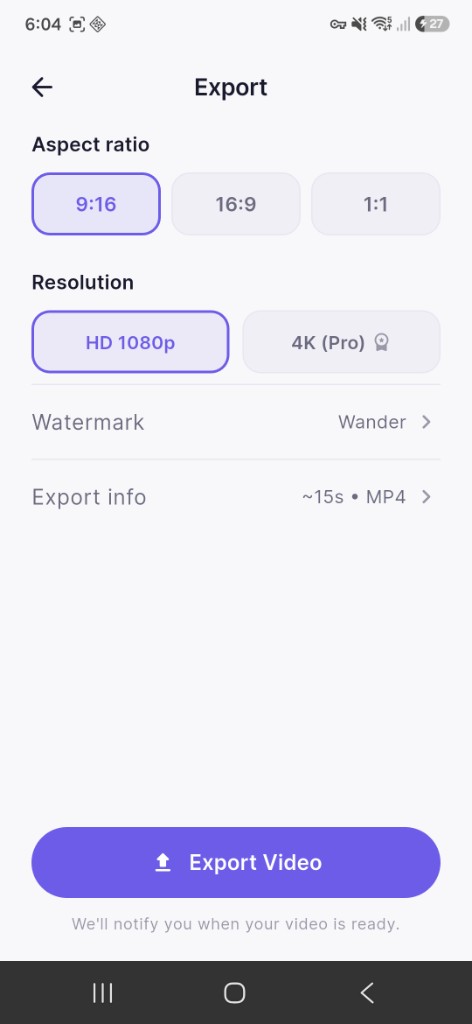
TikTok, Reels, and Shorts are 9:16. Pick that format in Wander before you export. If you export 16:9 and post it anyway, TikTok letterboxes the sides. Fifteen seconds is the default and a fair starting point. Five to twenty seconds is what we aim for on a phone. Longer is fine for YouTube. On TikTok it only works if the joke is the compression, like a huge road trip in 12 seconds.
Style and vehicle
Wander has 18 map styles on Free, including satellite, Golden Hour, Midnight Drive, Film, and topographic. Satellite is the obvious pick for a coast or a mountain road. A glow or night style reads better if the route is a city at dusk.
Match the vehicle to the trip: car for a road, boat for a coast, plane for a flight, train for a rail line, bicycle for a ride. Free includes those five. Pro adds campervan, bus, SUV, and motorcycle. The vehicle is what people watch, and on this page it is a car on the Causeway. Do not pick a plane for a drive.
Preview, export, then add sound in TikTok
Play the animation once. Check that the camera follows the path and that stop labels make sense, then export. Free is 1080p with a small watermark, which is enough to test a post. Pro removes the watermark and exports 4K. If it is going on an account you care about, Pro is the clean file. Save it to the camera roll and share it to TikTok.
Wander exports are silent on purpose. Add audio in TikTok. We do not ship music. A map video with no sound still plays, but we add a track that fits the trip rather than a meme that needs extra on-screen text to land.
Write the caption like a hook, not a filename. First line is the claim (“This 90-minute coast is the whole trip in 15 seconds”). Second line is the route and place: Causeway Coastal Route, Northern Ireland. End with a question and three to five hashtags. On-screen text in TikTok’s editor can sit in the top third. Keep it to one line. Extra stickers fight the map.
Use the place name plus a couple of specific tags such as #mapanimation or #roadtrip. Skip twenty generic ones. Place names help people who search the destination.
Things that look bad
Do not screen-record Google Maps. The camera jumps, labels clip, and you cannot pick a vehicle. It looks like a bug, because it is a screen recording.
Do not build this in After Effects unless you already live in AE. A cinematic map is a full motion-graphics job. Wander is the shortcut for a real route. Do not export landscape for TikTok. That format is right for YouTube and wrong here.
Do not pack a 40-stop itinerary into eight seconds. Cut to the spine of the trip. Split, Hvar, Dubrovnik reads. Every cafe between them does not.
If the trip is a drive with a GPX from the car, use the road trip map animation guide. If you already have the Google Maps link and nothing else, paste it.
Free and Pro
| Free | Pro | |
|---|---|---|
| Export | 1080p with watermark | 4K, no watermark |
| Projects | 5 projects, 20 stops | Unlimited |
| Vehicles | Car, plane, bicycle, train, boat | Plus campervan, bus, SUV, motorcycle |
| Price | £0 | £4.99/month or £24.99/year |
You can post a Free export. The watermark is the tradeoff.
Export a video from a route.
Free on Google Play. iPhone coming soon.